Skills for AI Agents
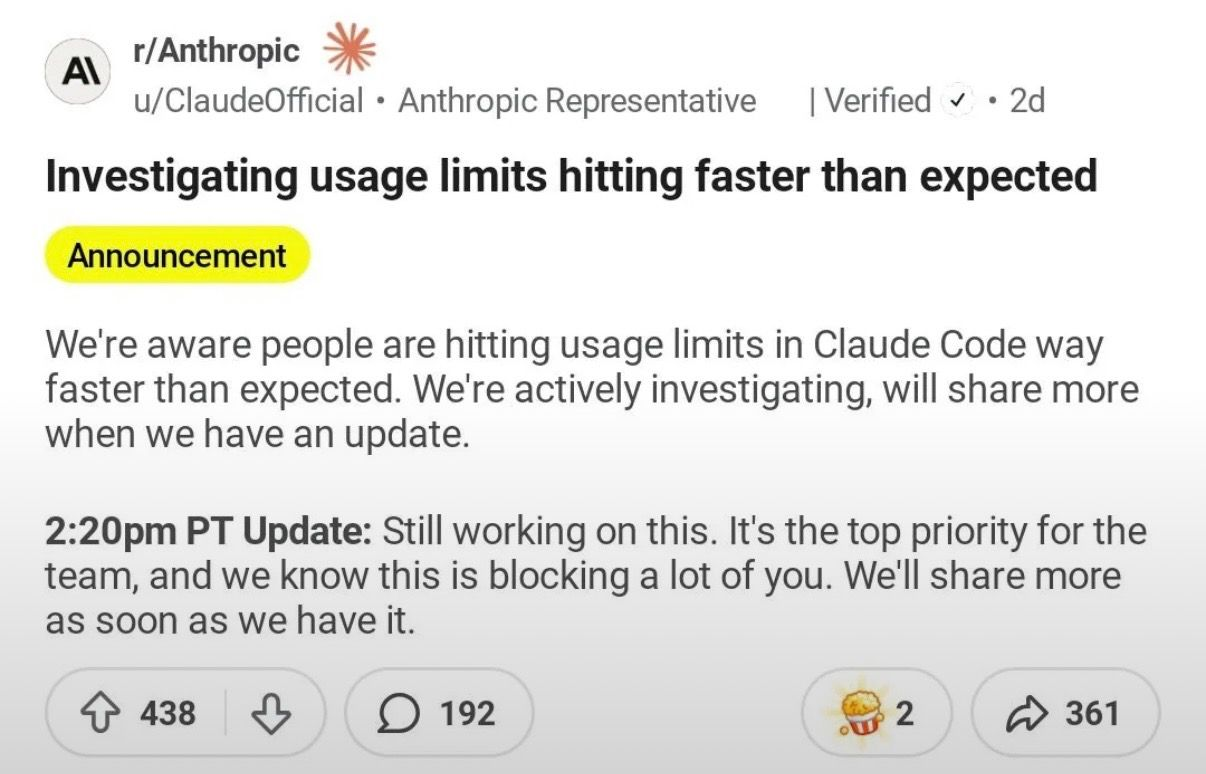
Apr 9, 2026Let’s talk about skills. Not soft skills or hard skills — skills for AI agents. While Anthropic figures out why Claude suddenly started burning even more tokens , I’ll explain how to help it burn them even faster.
What are skills
Skills is an approach that Anthropic formalized for Claude Code, and it’s gradually spreading to other agentic tools. The idea is simple: a SKILL.md is a separate markdown file describing a specific workflow scenario. The agent decides on its own when it’s appropriate, or you can invoke it directly: /skill-name
The point is to avoid explaining the same thing by hand every time. If there’s a recurring scenario — describe it once and reuse it.
Built-in skills
Before reaching for third-party packages, it’s worth seeing what’s already included. Some people still think of skills as something you get from a marketplace, but the basic ones are already built into the product.
It’s important not to confuse built-in skills with built-in commands. Commands like /help or /clear are hardwired logic. Built-in skills are ready-made scenarios in prompt form: Claude receives an instruction, figures out the codebase on its own, and spins up parallel agents if needed.
Built-in skills include: /batch, /simplify, /debug, /loop, /claude-api.
Batch
Batch — parallel execution of changes across a codebase. First it explores the project and breaks the work into 5–30 independent chunks, then shows you the plan. Once approved, it spawns one agent per chunk in a separate git worktree. Each agent does its part, runs tests, opens a pull request. Works well when a task can be cleanly sliced — for example, spreading one change across dozens of independent locations.
Simplify
Simplify — a dedicated pass over the code: remove unnecessary complexity, even out the style, prepare changes for the next step. It runs three agents in parallel, each checking against its own criteria, then merges the results. You can also give it an additional focus — memory efficiency, for example.
The official marketplace has an open-source code-simplifier plugin — one agent, one pass, a brief summary of changes on output. The built-in /simplify is the same idea, but three agents and evaluation from multiple angles.
Debug
Debug — enables debug logging for the current session and helps analyze the log.
Loop
Loop — runs a prompt or slash command on a recurring interval for as long as the current session is open.
Official Anthropic plugins
Atomic skills from Anthropic — each one solves exactly one task.
Code Review
code-review — reviews a PR through 5 parallel Sonnet agents with different specializations and confidence-level scoring: bugs, questionable decisions, CLAUDE.md violations, controversial parts of the diff.
Ralph Loop
ralph-loop — puts Claude into an autonomous loop: here’s the task, here’s the completion criterion, go until you finish or hit the iteration limit. Works well on clear tasks — for example, “keep fixing until tests go green.” On vague tasks it becomes a loop for the sake of looping.
Hookify
If a skill is a markdown instruction for Claude, a hook is a custom handler that fires on agent lifecycle events: a shell command, an HTTP endpoint, or an LLM prompt. There are many events — permission requests, tool errors, subagent start and stop, task creation and completion, and others. For example, you can set a hook that blocks any rm -rf without explicit confirmation — Claude won’t run the command until you approve.
hookify — a plugin for declaratively describing hook rules: you write a rule in markdown with YAML frontmatter, hookify maps it to a hook configuration. Same end result: Claude warns or blocks unwanted behavior — dangerous bash commands, console.log in production, hardcoded secrets.
Feature Dev
feature-dev — the official Anthropic plugin for feature development. This is no longer an atomic skill but a ready-made linear workflow: understand the codebase, clarify requirements, choose an implementation approach, implement, verify, and wrap up.
First it scopes the task and requirements. Then it spins up code-explorer to study the codebase: related modules, existing patterns, and integration points. After that it asks clarifying questions if any gaps remain. Next, through code-architect, it proposes several implementation options with trade-offs — minimal changes, cleaner architecture, or a pragmatic balance. Only then does it move to implementation, quality review, and wrap-up.
That’s far from a complete list. Anthropic has a general plugin catalog for different scenarios — for example, Frontend Design for generating less generic interfaces, or Claude Code Setup, which analyzes your codebase and suggests which hooks, skills, MCP servers, and subagents to install. For third-party aggregators — SkillsMP collects open-source skills from GitHub with search and filters.
Before installing, read the skill — if one SKILL.md tries to do everything, the agent will get confused.
Third-party frameworks
Superpowers
Superpowers — the most popular skill framework for coding agents, 142k stars on GitHub at the time of writing. My personal favorite. As the authors put it in the README: an agent should not immediately start writing code. First — clarify what you actually want. Then — design. Then — an implementation plan. Only then execution, review, and verification.
That’s exactly why Superpowers works well not on small edits but on refactors and architectural changes — where an agent without guardrails quickly starts producing slop.
Personally, Superpowers helped me rewrite a large project: the agent worked for an hour without my involvement, the architecture got better, and subsequent development became easier. I now use it when I need to implement a feature that requires touching half the core, or when I have no idea how to implement it at all.
What to know before starting
Install with: /plugin install superpowers@claude-plugins-official. Commands for other agents are on GitHub. After installation some deprecated commands may appear — usually fixed by running the skill once or restarting Claude Code.
You don’t have to invoke skills with slash commands — you can write naturally:
Do a brainstorm on automating the retrieval of Y data for feature X.
Claude will pick it up if the skill is installed and relevant.
Workflow
brainstorming— if the task requires first understanding the code, architecture, or design. The agent studies context, asks clarifying questions, and proposes several solution options.writing-plans— can be launched directly if requirements are already clear. The agent assembles a spec and implementation plan, then offers it for review before starting.subagent-driven-development— implementation of the plan via TDD. The agent distributes tasks to subagents: independent pieces run in parallel, overlapping ones run sequentially. It picks the right model for each subtask: simple things go to Sonnet, heavy things go to Opus.- After implementation the agent usually runs tests and gets to review on its own. If not — you can invoke
requesting-code-review. Found bugs get fixed automatically. If you want a separate sanity check —verification-before-completion. finishing-a-development-branch— close out the development branch.
Worth mentioning separately: systematic-debugging — for cases where you need to find the root cause first, not write yet another fix. Four phases: find the cause, compare with similar working code, validate the hypothesis with a minimal change, apply the fix. Useful for regressions and weird test failures — anywhere the agent would otherwise start guessing.
Superpowers vs Feature Dev
Both feature-dev and Superpowers first examine the existing project. The difference isn’t whether they study the code — it’s how that’s embedded in the process. In feature-dev it’s a discrete phase inside one ready-made feature-development workflow. In Superpowers it’s only the beginning of a broader methodology: first understand structure and patterns, then approve the design, assemble a detailed plan, then TDD, subagents, review, and debugging.
The way I see it:
- Superpowers — when the task is large, architectural, risky, or poorly defined.
- Feature Dev — when the task is already clearer and more localized, but you want to integrate it into the project without unnecessary agent improvisation.
Heavy artillery
There’s also a heavier class of tools — they’re about process management: specification, disambiguation, planning, re-verification, and only then implementation.
Spec Kit
Spec Kit (86k stars) — not just about a plan and spec before implementation. Superpowers does that too. The difference is in the standard: Superpowers has freeform artifacts, Spec Kit has a standardized scaffold around .specify/. Project principles live in .specify/memory/constitution.md, each feature gets a .specify/specs/<feature>/ directory — where spec.md appears first, then plan.md, then tasks.md; during planning there may also be research.md, data-model.md, quickstart.md, and contracts/. The full chain: constitution → specify → clarify → plan → tasks → implement. The scaffold isn’t rigid — presets and extensions can change templates and the process.
Spec Kit is often seen as a tool for new projects and a spec-first approach, but it officially supports existing projects too — that scenario is just less polished and less documented so far.
OpenSpec
OpenSpec (38k stars) is built for existing projects and change-driven workflows. Its core is the separation between openspec/specs/ as the single source of truth about the current system state and openspec/changes/<change>/ as the space for a specific change: proposal.md, design.md, tasks.md, and delta-specs live there. Instead of rewriting the full system description — you record only what’s being added, changed, or removed.
OpenSpec and Superpowers aren’t competitors — they address different things. OpenSpec answers “what exactly are we changing and why”, Superpowers answers “how to implement it”. You can use both: OpenSpec locks in the change, Superpowers carries it out.
GSD
GSD (Get Shit Done, 49k stars) is marketed as an antidote to vibe-coding — no corporate bureaucracy, but engineering discipline on the inside. On the surface — a handful of commands (spoiler: there are quite a few, and the user guide is enormous). Under the hood — context management, orchestration, state management, and quality checks.
What sets it apart from other frameworks is heavier orchestration, an explicit state layer in .planning/, and utilities for existing projects. For an existing project, /gsd:map-codebase runs parallel agents to analyze the stack, architecture, conventions, and problem areas. Then GSD breaks the task into phases and builds a foundation: questions, research, requirements, and a plan. Research is one of the most useful parts here — the agent digs into bottlenecks, evaluates options, and surfaces risks. Then for each phase — a standard cycle: clarify → plan → implement → verify. GSD’s main bet isn’t the cycle itself but keeping Claude from losing context and degrading on quality over the long haul. Hence the built-in safeguards: schema drift detection, safety controls, scope creep detector.
In practice I got something different from what was promised. We rewrote the spec several times, refined it, rewrote it again — as if the feature were worth millions instead of being a two-day task. The task got split into 4 phases when 2 would have been enough. Each phase — full cycle from scratch. Multiple context windows to get to the end. The feature shipped with bugs, and then it turned out it didn’t solve the problem at all. No amount of spec, research, and review prevented any of that. Through Superpowers this would have taken far less — including discovering that the feature wasn’t needed.
Compound Engineering
Compound Engineering (14k stars) — a toolset built around Claude with an emphasis on knowledge accumulation. The loop: brainstorm → plan → work → review → accumulate.
50+ agents, 40+ skills. During review, narrowly specialized personas are activated — security, correctness, API contracts, and others. Irrelevant ones are skipped: no UI — no design lens, no auth — no security lens. The idea is for the results of work not to get lost but to become reusable patterns.
I tried it — mixed impressions. CE is aimed at vibe-coding: they recommend running with --dangerously-skip-permissions (I respect the boldness, but auto-mode is safer). In practice it does roughly the same thing as Superpowers but heavier and without multi-agent — everything in one long context, which is always expensive on tokens. A million review agents still didn’t catch the bugs. The reviewers were looking for inconsistencies in the code itself, and the real problem was elsewhere: one of the agents encountered a half-dead API, silently fell back to cache, and never reported that the API had stopped responding. Not a single reviewer caught that — they were checking whether the code was internally consistent, not what assumptions it was built on.
The main appeal — accumulation: knowledge about problems, solutions, and bugs is preserved for future sessions, and cross-references between documents are genuinely useful. But in practice documents pile up and the agent gets lost in them. CE isn’t bad as a mechanism for generating engineering memory, but retrieving it reliably over the long haul is better handled through a dedicated retrieval layer — something like a project RAG with versions, dates, and a separation of current from outdated — rather than hoping the agent will find its way through a sprawling pile of markdown files.
In spirit CE and GSD sit next to each other — both for people willing to trust the system and step back.
How to get started without getting lost
You don’t need to pick one framework and live with it. They address different context losses and combine well.
If you’re just starting out — begin with Plan Mode. Any task that touches more than two files: plan first, then code. Get used to editing the plan like a document. Add code-review for PR reviews — it’s a good entry point: clear what you’re installing and why.
Also try Ultraplan — a layer on top of Plan Mode that offloads planning to a cloud web session of Claude Code. The plan is assembled in the cloud, you comment and request changes in the browser, then run the implementation there or bring it back to the terminal. Currently in research preview.
Next step — Superpowers and/or feature-dev. Do 1–2 real features strictly through the cycle: brainstorm → plan → implementation via subagents → TDD → review. Define your own rules: when Superpowers is mandatory, when Plan Mode is enough. If it feels heavy — fall back to Plan Mode with your own mini-rules, that’s fine too.
Need a formal spec — OpenSpec or Spec Kit. OpenSpec — for existing projects and minimal overhead. Spec Kit — for new projects and GitHub-centric workflows.
If you want more — there are tools for that. Compound Engineering — if accumulating knowledge after each task matters. GSD — if you like a rigid phase-by-phase process. Both require a willingness to trust the system and not interfere.
Each of these frameworks actually contains far more skills than I could cover at once. Some have iOS app support, some verify web interfaces at each verification step. But the best framework still comes down to good instincts and sound judgment. An agent can latch onto one unverified assumption and build an entire system on top of it.
P.S. In general, some skills can coexist in the same project. For example: Superpowers — implementation management, OpenSpec — change management, Compound Engineering — knowledge accumulation. Three separate layers. But to me that feels like overengineering.
Don’t overload on skill packages — skills have a deferred context model (low cost until invoked), but heavy frameworks with dozens of skills still add noise.
P.P.S. For the truly adventurous: if you want a whole team of agents in your terminal — from CEO to QA — take a look at gstack and BMAD-METHOD . But that’s a different story.